Start Issuance
Issuance can be started from the WebApp or via the Workflow Scheduler API.
Issuance Page
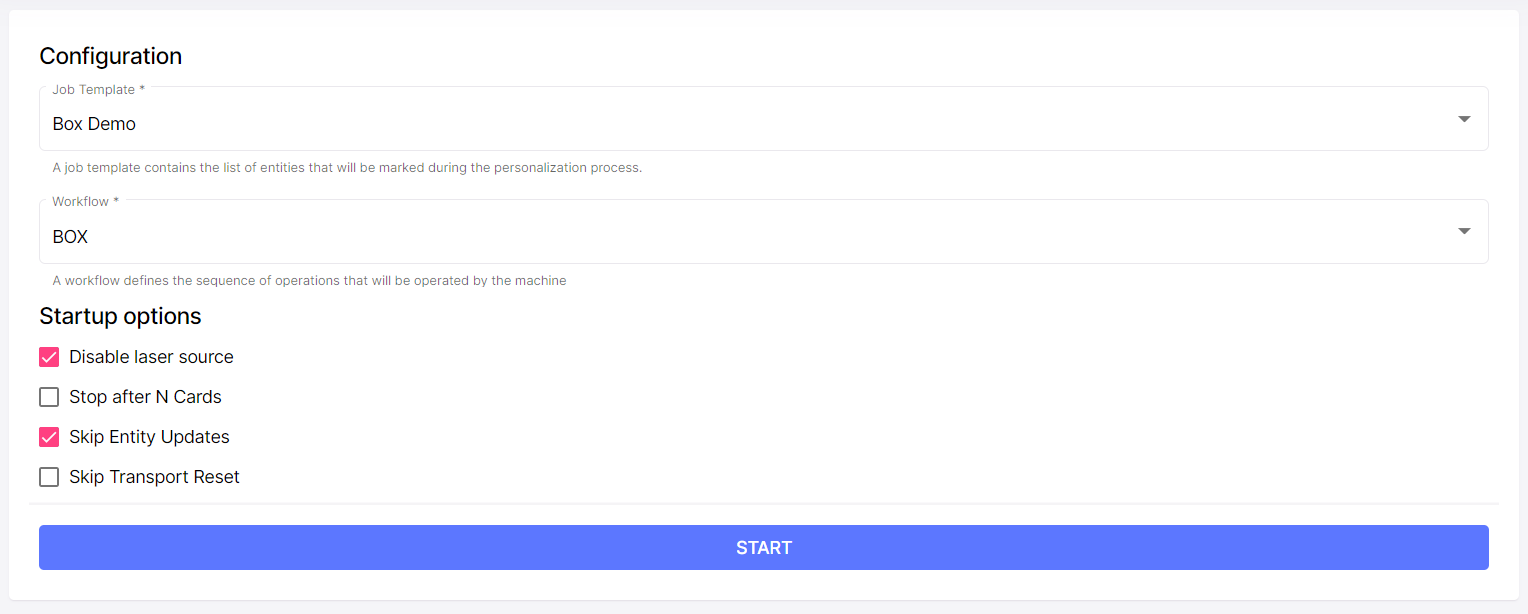
The system will require us to specify:
Configuration
This are required parameters. Define what the machine will print (the Job Template) and how it will do it (the Workflow)
Workflow
The workflow defines the sequence of actions that will be performed by the machine for each card that it will process. On almost every system this option will not be selectable, and can be left with default value (which varies from system to system).
Startup Options
Startup options let us set some parameters that will change the behavior of the system at runtime. This is useful for testing before going on production. Available options are:
Disable Laser Source
Turns off the laser source. The red spot will be visible and the scan head will move as if it was marking. We can use this option to test/validate our setup.
Stop after N cards
Tells the system to automatically stop after the specified number of cards were processed.
Skip Entity Updates
Bypasses the database. Templates are printed without replacing entities values
Scheduler API
The webapp uses the scheduler API to start/stop issuance. The StartWorkflowScheduler endpoint accepts a WorkflowSchedulerStartupParamsDto object as a parameter. The first 6 fields of WorkflowSchedulerStartupParamsDto map 1-to-1 with what we've seen in the form above.
Task Allocation Strategy
Tells the system which strategy it should use to balance mark jobs across available laser modules.
Disable Red Pointer
Turns off the red-pointer. This is useful for testing workflows that require XY Auto-Positioning with the laser source disabled.
- Angular
- C#
- HTTP
  import { WorkflowSchedulerService } from '@ixla/aida-sdk-angular';
  ...
  constructor(private readonly scheduler: WorkflowSchedulerService) {}
  ...
  const schedulerState = await this.scheduler.StartWorkflowScheduler({
    workflowSchedulerStartupParamsDto: {
      StopAfter : -1, // the system keeps polling the __DET__ table for records in 'Waiting' state
      JobTemplateName : 'my job template name',  // the job template that defines the desired personalization process
      DryRun : false,  // Useful for testing, does not personalize cards
      NoReset : false, // If true skips the transport reset when the scheduler starts
      SkipEntityUpdates : false // Useful for testing/demos, the system creates mock records (personalization fields are set to null)
    }
  }).toPromise();
  ...
  using IXLA.AIDA.Sdk;
  ...
  private readonly WorkflowSchedulerService _scheduler;
  ...
  WorkflowSchedulerStateDto schedulerSate = await _scheduler.StartWorkflowScheduler(new WorkflowSchedulerStartupParamsDto {
    StopAfter = -1,
    JobTemplateName = 'my-job-template',
    DryRun = false,
    NoReset = false,
    SkipEntityUpdates = false
  });
  ...
POST /AIDA/v1/workflow-scheduler/start
Host: $BOX_IP_ADDRESS:5000
Accept: application/json

{
    "jobTemplateName": "my-job-template",
    "dryRun": true,
    "stopAfter" : -1,
    "skipEntityUpdates": true,
    "noReset": false
}
{
  "status": "Starting",
  "queueSize": 0,
  "errorDetails": "string",
  "lastLoadedItemId": 0,
  "upTimeSeconds": 0,
  "currentJobTemplate": {
      ...
  }
}